
In a Nutshell
Build UI5 Apps Purely in ABAP
abap2UI5 is an open-source framework that brings the simplicity of classic ABAP development to modern UI5 apps. Just as Selection Screens and ALV grids let you build working UIs with only a few lines of ABAP, abap2UI5 brings that same simplicity to modern web apps:
CLASS zcl_my_app DEFINITION PUBLIC.
  PUBLIC SECTION.
    INTERFACES z2ui5_if_app.

  PROTECTED SECTION.
  PRIVATE SECTION.
ENDCLASS.

CLASS zcl_my_app IMPLEMENTATION.
  METHOD z2ui5_if_app~main.
    client->message_box_display( `Hello World` ).
  ENDMETHOD.
ENDCLASS.That's it — your first UI5 app is ready. (client is the single parameter of main, passed in by the framework — explained on the Hello World page.)
A finished app looks like any other UI5 app, because it is one — a selection screen, a table, a dialog, all of it built from the same single class:
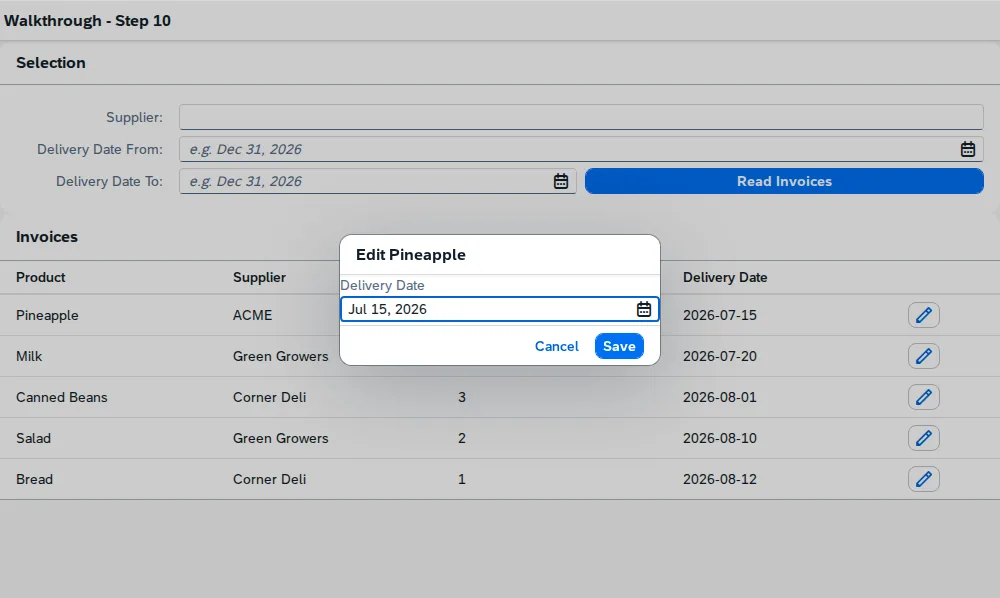
→ The Tutorial grows exactly this app in ten steps, each one a complete class you can run in the browser — then takes it to production, and under unit tests
Background
Since launching in 2023, abap2UI5 has grown from a small side project into a community-driven framework. The framework absorbs frontend complexity, so you can focus on business logic with your existing ABAP skills. Each app ships as an abapGit project, so installation across systems needs no separate frontend deployment.
This page is the technical picture. What abap2UI5 means for an organization - what it can build, how it compares, what it costs - is on abap2UI5 for decision makers, written for the people who approve a tool rather than build with it.
→ See the Quickstart for step-by-step setup, and Sample Apps to watch abap2UI5 in action
How It Works
The frontend is a UI5 shell that only renders. Your ABAP class builds a UI5 XML view, the framework sends it to the browser in one response with the JSON model its controls bind to, and every user interaction comes back as a fresh call into main( ). No OData service sits in between.
No ABAP session survives between two clicks, and that is deliberate: the app's state is written to a draft on the server, the browser keeps only its id, and the draft is restored before main( ) runs again, so each request is a new ABAP session holding your app exactly as the user left it — stateless like any other UI5 app, which is what makes it scale. For the few cases that need a pinned session, a stateful mode exists.
Outside the SAP world this pattern has a name — HTML Over-the-Wire, the idea behind htmx, Hotwire and Phoenix LiveView. abap2UI5 applies it to UI5.
Overview
Architecture
A thin frontend: the browser renders, and everything else — logic, data, state — stays in the backend. There is nothing to configure on the client and nothing to clear from its cache, and business data never leaves the server except as the view the user is looking at.
Performance
One roundtrip per interaction, with the data in the same response as the view — no OData call per control, no second request to fill what the first one drew. That is fewer round trips than a freestyle UI5 app makes for the same screen, and it is where the speed comes from.
→ See Performance for what to measure and what to tune
Security
The frontend gets only what the backend puts into the view. There is no OData endpoint to query from outside, so an external tool sees no service and no table — only the screens a user is authorized to open.
Authentication is the ICF node's job, exactly as for any other service on your system, and the framework ships a Content-Security-Policy by default. Authorization stays yours: whatever the user sends still arrives from a browser, so check it in the app or on the service node, as you would in any other program.
→ See Security for the endpoint, the CSP and what the framework does not do for you, and Authorization for setting up checks
System Footprint
The framework has a small system footprint — essentially classes, interfaces, and a single draft table. The core stays minimal; optional add-ons provide extra functionality only when you need it.
→ See Add-ons for the ecosystem around the core — layout variants, table maintenance, charts
Compatibility
abap2UI5 uses released APIs only, so the same source runs on ABAP Cloud and on Standard ABAP; CDS, ABAP SQL and EML are available inside an app where the system has them.
System Support
Works with both ABAP Cloud and Standard ABAP:
- S/4 Public Cloud and BTP ABAP Environment (ABAP for Cloud)
- S/4 Private Cloud or On-Premise (ABAP for Cloud, Standard ABAP)
- R/3 NetWeaver AS ABAP 7.02 or later (Standard ABAP)
Below 7.50 you pull the 702 branch instead of main — same features, generated from it automatically. See Downporting.
UI5 Versions
The frontend is UI5 itself, loaded at bootstrap like it is for any other UI5 app. abap2UI5 bootstraps OpenUI5 from its public CDN by default; a single exit points it at SAPUI5, at a pinned version, or at the UI5 already delivered by your own system — which is what a system without internet access uses. 1.71 is the oldest supported release, and every change is tested against UI5 2.x as well.
→ See UI5 Versions for the distributions, and Bootstrapping for choosing the source
Integration
Where an App Appears
An app runs in a browser tab on its own, or embedded into:
- Fiori Launchpads on S/4 On-Premise
- Tiles on S/4 Public Cloud
- Build Work Zone Websites on BTP
- Any UI5 app of your own, a Fiori elements page or a UI Integration Card, with the embed control (
@abap2ui5/embed-controlon npm) - A tab in Microsoft Teams, the task pane of Microsoft Excel, or a native app on iOS and Android
→ See Integration for every place an app can appear
Beyond the ABAP Stack
The framework also runs without an SAP system: every release is published as @abap2ui5/node-runtime, abap2UI5 transpiled to JavaScript. cap2UI5 builds on it and hosts abap2UI5 in a CAP project (@cap2ui5/cds-plugin), with the samples as @cap2ui5/samples.
Tooling, Community
None of the tooling is required — an app is one class in your system, and ADT is enough. What exists is worth the ten minutes: a linter that checks a view without a system, an MCP server that lets an assistant build and look at the app, and a VS Code extension that runs it on F9. An app is a single ABAP class, in one language, that an assistant can also verify — which makes abap2UI5 unusually well suited to being written with one.
→ See Tooling for the setup, and Developing with AI for the assistant workflow
Volunteers maintain abap2UI5, and the community is where help comes from: Support on GitHub and Slack, the Contribution Guide for fixing and building, and sponsorship if the project saves yours time.