
Popup
A popup is a dialog that lies over the view. In abap2UI5 it is a small view of its own: the app builds it as XML and shows it with client->popup_display( ).
| I want to… | Section |
|---|---|
| show a dialog and close it again | Open and Close a Popup |
| ask a yes/no question or show a message | Just a Question? Use a Message Box |
| reuse one popup in several apps and get its answer | A Reusable Popup as Its Own Class |
| open a popup from a popup | One Popup at a Time |
Open and Close a Popup
The usual flow has three steps: the app shows its view, an event opens the popup, and an event from inside the popup closes it. The popup is built like a view, with two differences. The root is a FragmentDefinition, UI5's name for a piece of XML that is not a whole view. And it is shown with popup_display( ) instead of view_display( ):
  METHOD z2ui5_if_app~main.

    IF client->check_on_navigated( ).

      DATA(view) = z2ui5_cl_ui5_view_builder=>factory(
          )->ele( n = `View` ns = `mvc`
              )->a( n = `xmlns`     v = `sap.m`
              )->a( n = `xmlns:mvc` v = `sap.ui.core.mvc`

              )->ele( `Page`
                  )->a( n = `title` v = `abap2UI5 - Popups`

                  )->tag( `Button`
                      )->a( n = `text`  v = `open the popup`
                      )->a( n = `press` v = client->_event( `POPUP_OPEN` ) ).

      client->view_display( view->stringify( ) ).

    ELSEIF client->check_on_event( `POPUP_OPEN` ).

      DATA(popup) = z2ui5_cl_ui5_view_builder=>factory(
          )->ele( n = `FragmentDefinition` ns = `core`
              )->a( n = `xmlns`      v = `sap.m`
              )->a( n = `xmlns:core` v = `sap.ui.core`

              )->ele( `Dialog`
                  )->a( n = `title` v = `Popup`

                  )->tag( `Text`
                      )->a( n = `text` v = `this is a text in a popup`
                  )->tag( `Button`
                      )->a( n = `text`  v = `close`
                      )->a( n = `press` v = client->_event( `POPUP_CLOSE` ) ).

      client->popup_display( popup->stringify( ) ).

    ELSEIF client->check_on_event( `POPUP_CLOSE` ).

      client->popup_destroy( ).

    ENDIF.

  ENDMETHOD.
Two calls are all there is: client->popup_display( xml ) opens the popup and client->popup_destroy( ) closes it. Changed data needs neither. When a bound attribute changes while the popup is open, the framework sends the new value into the open popup with the response.
The view behind the popup stays as it is. Opening and closing a popup sends no new main view.
A popup binds data exactly like a view: _bind( ) works inside it, and what the user typed is in the attribute on the next roundtrip. An input field in a popup therefore needs nothing extra to get its value back to the app.
Just a Question? Use a Message Box
A message, a confirmation or a yes/no question needs no XML at all. client->message_box_display( ) shows a sap.m.MessageBox. Its buttons are a table, and its answer arrives as a backend event. Message lists the parameters. Build a Dialog of your own when the popup holds input fields or a table.
A Reusable Popup as Its Own Class
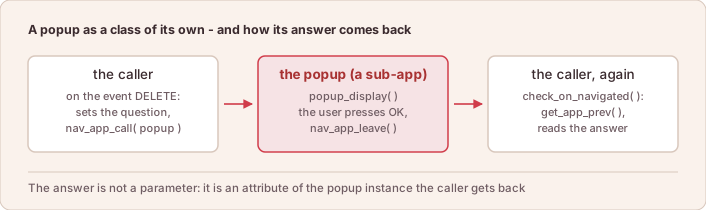
A popup that several apps need goes into a class of its own. The caller starts it with navigation, like any other app. Such a popup is an ordinary z2ui5_if_app. It differs from a normal app in two points: it calls popup_display( ) instead of view_display( ), and it ends with nav_app_leave( ), which hands control back to the caller:
CLASS zcl_sample_confirm DEFINITION PUBLIC.

  PUBLIC SECTION.
    INTERFACES z2ui5_if_app.

    DATA mv_question TYPE string.

    METHODS confirmed
      RETURNING
        VALUE(result) TYPE abap_bool.

  PROTECTED SECTION.
    DATA mv_confirmed TYPE abap_bool.

  PRIVATE SECTION.
ENDCLASS.

CLASS zcl_sample_confirm IMPLEMENTATION.
  METHOD z2ui5_if_app~main.

    IF client->check_on_navigated( ).
      DATA(popup) = z2ui5_cl_ui5_view_builder=>factory(
          )->ele( n = `FragmentDefinition` ns = `core`
              )->a( n = `xmlns`      v = `sap.m`
              )->a( n = `xmlns:core` v = `sap.ui.core`

              )->ele( `Dialog`
                  )->a( n = `title` v = `Please confirm`

                  )->tag( `Text`
                      )->a( n = `text` v = client->_bind( mv_question )

                  )->ele( `buttons`
                      )->tag( `Button`
                          )->a( n = `text`  v = `OK`
                          )->a( n = `press` v = client->_event( `CONFIRM` )
                      )->tag( `Button`
                          )->a( n = `text`  v = `Cancel`
                          )->a( n = `press` v = client->_event( `CANCEL` ) ).

      client->popup_display( popup->stringify( ) ).
    ELSEIF client->check_on_event( `CONFIRM` ).
      mv_confirmed = abap_true.
      client->nav_app_leave( ).
    ELSEIF client->check_on_event( `CANCEL` ).
      mv_confirmed = abap_false.
      client->nav_app_leave( ).
    ENDIF.

  ENDMETHOD.

  METHOD confirmed.

    result = mv_confirmed.

  ENDMETHOD.
ENDCLASS.The caller sets the question, hands the instance to nav_app_call( ), and reads the answer back off the same instance when control returns:
IF client->check_on_event( `DELETE` ).
  DATA(lo_confirm) = NEW zcl_sample_confirm( ).
  lo_confirm->mv_question = `Delete this entry?`.
  client->nav_app_call( lo_confirm ).
ELSEIF client->check_on_navigated( ).
  TRY.
      DATA(lo_prev) = CAST zcl_sample_confirm( client->get_app_prev( ) ).
      IF lo_prev->confirmed( ) = abap_true.
        delete_entry( ).
      ENDIF.
    CATCH cx_sy_move_cast_error.
      " not back from the popup - on the first start get_app_prev( )
      " is this app itself
  ENDTRY.
  view_display( ).
ENDIF.
Two things carry the whole pattern. The popup keeps its answer in an attribute of its own instance, and the caller reaches that instance with get_app_prev( ). No view binds the answer, so the attribute stays protected and the caller reads it through confirmed( ).
There is a second way to get the answer back. The popup can hand it over when it leaves: nav_app_leave( event = … r_data = … ) gives the caller an event name and the data in one step. Use it when the caller has to tell "returned with a result" from "just returned". Handing a Result Back shows both sides.
A ready-made set of such popups — confirm, select, ranges, file up- and download and about a dozen more — is the popups add-on, which is versioned on its own.
One Popup at a Time
The frontend shows one popup. A second popup_display( ) replaces the first, because the frontend keeps no stack of popups. A popup that opens another one and wants to come back afterwards keeps that stack itself: it remembers in an attribute which popup was open, and displays it again when the second one closes. Sample Z2UI5_CL_SMP_APP_161 does exactly that. A popover follows the same rule, separately from the popup.
A new main view closes the popup as well. view_display( ) is a new screen, and the popup and the popover go with it. Both live outside the main view and would otherwise float over a page they no longer belong to. A handler that sends a new main view and wants the popup to stay calls popup_display( ) again in the same roundtrip. The frontend then builds the main view first and the popup after it.
Most popups need none of this. A handler inside a popup changes data and returns, and the popup stays open with the new values in it.
Working Samples
Complete apps from the sample catalog that use what this page describes. Each is a single class in abap2UI5/samples unless its row names another of the three sample repositories — pull that repository with abapGit and start the class with ?app_start=<class>.
| Sample | Class |
|---|---|
| Ways to Open a Dialog (A) | Z2UI5_CL_SMP_APP_012 |
| Value Help: Suggestions and F4 Dialog | Z2UI5_CL_SMP_APP_009 |
| Dialog inside a Dialog | Z2UI5_CL_SMP_APP_161 |
| Navigate between Dialogs (NavContainer) (A) | Z2UI5_CL_SMP_APP_170 |
| Element Binding to the Selected Row (A) | Z2UI5_CL_SMP_APP_470 |