
Navigating Between Apps
Navigation inside one abap2UI5 deployment: switching screens within a class, and calling one of your app classes from another. Everything here runs through the abap2UI5 backend and its own app stack — it never leaves the page, and the launchpad, if there is one, does not hear about it. Navigating between Fiori apps is a different mechanism: Launchpad Navigation.
In abap2UI5, each app is a single ABAP class. You can pack all logic into one class, but keeping classes at a reasonable size is better practice. Splitting functionality into multiple interacting classes lets you build reusable apps and popups that work in different contexts.
Within One Class
Two screens that share their data belong in one class. An attribute remembers which screen is shown, the events change it, and view_display( ) builds the view that matches. There is no call and no return, so the app stack is not involved:
CLASS zcl_sample_two_screens DEFINITION PUBLIC.

  PUBLIC SECTION.
    INTERFACES z2ui5_if_app.

  PROTECTED SECTION.
    DATA client    TYPE REF TO z2ui5_if_client.
    DATA mv_screen TYPE string VALUE `LIST`.

    METHODS view_display.

  PRIVATE SECTION.
ENDCLASS.

CLASS zcl_sample_two_screens IMPLEMENTATION.
  METHOD z2ui5_if_app~main.

    me->client = client.

    IF client->check_on_navigated( ).
      view_display( ).

    ELSEIF client->check_on_event( `SHOW_DETAIL` ).
      mv_screen = `DETAIL`.
      view_display( ).

    ELSEIF client->check_on_event( `BACK` ).
      mv_screen = `LIST`.
      view_display( ).

    ENDIF.

  ENDMETHOD.

  METHOD view_display.

    DATA(view) = z2ui5_cl_ui5_view_builder=>factory(
        )->ele( n = `View` ns = `mvc`
            )->a( n = `xmlns`     v = `sap.m`
            )->a( n = `xmlns:mvc` v = `sap.ui.core.mvc` ).

    IF mv_screen = `LIST`.
      view->ele( `Page`
          )->a( n = `title` v = `List`
          )->tag( `Button`
              )->a( n = `text`  v = `show the detail`
              )->a( n = `press` v = client->_event( `SHOW_DETAIL` ) ).
    ELSE.
      view->ele( `Page`
          )->a( n = `title`          v = `Detail`
          )->a( n = `showNavButton`  v = `true`
          )->a( n = `navButtonPress` v = client->_event( `BACK` )
          )->tag( `Text`
              )->a( n = `text` v = `the second screen of the same class` ).
    ENDIF.

    client->view_display( view->stringify( ) ).

  ENDMETHOD.
ENDCLASS.Use this form whenever the screens share their data. Two views over the same internal table are two branches of one class, not two classes.
Between App Classes
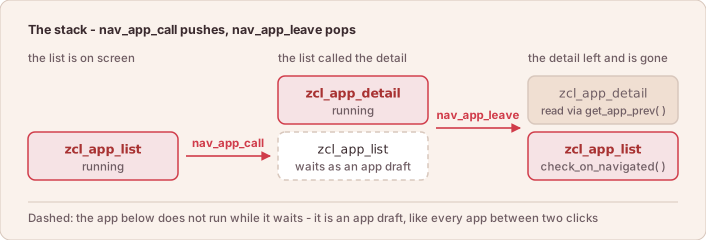
To call another app class, create an instance and hand it to nav_app_call( ). The call belongs inside an event branch. A nav_app_call( ) that runs on every call of main starts the other app again on every return, which is an endless loop:
ELSEIF client->check_on_event( `OPEN_DETAIL` ).
  DATA(lo_app) = NEW zcl_sample_new_app( ).
  client->nav_app_call( lo_app ).
The framework keeps a call stack. The app that was called is the sub-app. It returns to the app that called it with nav_app_leave( ), again from an event branch:
ELSEIF client->check_on_event( `BACK` ).
  client->nav_app_leave( ).
To read data from the previous app, cast it like this. check_on_navigated( ) is true on the first start as well, and get_app_prev( ) then returns the running app itself, so the cast is guarded:
  METHOD z2ui5_if_app~main.

    IF client->check_on_navigated( ).
        TRY.
            DATA(lo_called_app) = CAST zcl_sample_new_app( client->get_app_prev( ) ).
            client->message_box_display( `Input made in the previous app:` && lo_called_app->mv_input ).
          CATCH cx_sy_move_cast_error.
            " not back from zcl_sample_new_app - the first start, for one
        ENDTRY.
        view_display( ).
    ENDIF.

ENDMETHOD.
Re-display your view on return
When the sub-app took over the screen with its own view_display( ), the browser still shows that view after nav_app_leave( ) — the framework does not restore the previous view automatically. Call view_display( ) again in the check_on_navigated( ) branch. Your class attributes survived the roundtrip serialization, so no data re-read is needed — only the view must be rendered again. See App Structure.
Called with an app instance, nav_app_leave works differently: it leaves the current app and starts the given one without pushing the current app onto the call stack — so there is nothing to return to. Use this to navigate forward while discarding the current app:
ELSEIF client->check_on_event( `NEXT` ).
  DATA(lo_app) = NEW zcl_sample_new_app( ).
  client->nav_app_leave( lo_app ).
TIP
Sounds familiar? The abap2UI5 framework echoes classic call screen and leave to screen behavior.
nav_app_call( ) and both forms of nav_app_leave( ) need a bound instance — NEW zcl_sample_new_app( ) with whatever it needs set on it before the call. An unbound reference raises NAV_APP_TARGET_NOT_BOUND and the roundtrip ends in the error dialog. A plain nav_app_leave( ) with nothing to return to — a root app, or a caller whose app draft has expired — is dropped: the roundtrip ends on this app, which keeps the screen. Guard it with check_app_prev_stack( ), as the example below does.
Handing a Result Back
Reading the sub-app's attributes through get_app_prev( ) is one way back. The other is to hand the result over on the way out with nav_app_leave( event = … r_data = … ). The caller finds that event in check_on_event( ) on arrival, so it can tell a return with a result from a plain return. The data arrives in client->get( )-r_event_data, a reference to a copy of it:
" in the sub-app
ELSEIF client->check_on_event( `CONFIRM` ).
  client->nav_app_leave( event  = `DATA_CONFIRMED`
r_data = ms_result )." in the caller: the way back enters through check_on_navigated( ),
" with the event name and the payload in the same get( )
IF client->check_on_navigated( ).
DATA(ls_get) = client->get( ).
IF ls_get-event = `DATA_CONFIRMED`.
ASSIGN ls_get-r_event_data->* TO FIELD-SYMBOL(<s_result>).
ms_result = <s_result>.
ENDIF.
view_display( ).
ENDIF.An intentionally empty value still arrives. Z2UI5_CL_SMP_APP_488 is the pair of classes written out.
The Whole Stack in One Class
The sub-app does not have to be a different class. An app that calls another instance of itself shows the stack, the return and get_app_prev( ) in one runnable piece — press Run and walk down and back up:
CLASS zcl_sample_stack DEFINITION PUBLIC.

  PUBLIC SECTION.
    INTERFACES z2ui5_if_app.

    DATA mv_note TYPE string.

  PROTECTED SECTION.
    DATA mv_level TYPE i.

  PRIVATE SECTION.
ENDCLASS.

CLASS zcl_sample_stack IMPLEMENTATION.
  METHOD z2ui5_if_app~main.

    IF client->check_on_navigated( ).

      " Coming back up: read what the app above left on its own instance
      " (on the first start get_app_prev( ) is this instance, on the way
      " down it is the caller - only on the way up is it a deeper level)
      DATA(lo_prev) = CAST zcl_sample_stack( client->get_app_prev( ) ).
      IF lo_prev->mv_level > mv_level.
        mv_note = |back from level { lo_prev->mv_level }|.
      ENDIF.

      DATA(view) = z2ui5_cl_ui5_view_builder=>factory(
          )->ele( n = `View` ns = `mvc`
              )->a( n = `xmlns`     v = `sap.m`
              )->a( n = `xmlns:mvc` v = `sap.ui.core.mvc`

              )->ele( `Page`
                  )->a( n = `title` t = |Level { mv_level }|

                  )->tag( `Text`
                      )->a( n = `text` v = client->_bind( mv_note )
                  )->tag( `Button`
                      )->a( n = `text`  v = `call one level deeper`
                      )->a( n = `press` v = client->_event( `DOWN` )
                  )->tag( `Button`
                      )->a( n = `text`    v = `leave, back to the caller`
                      )->a( n = `press`   v = client->_event( `UP` )
                      )->a( n = `enabled` b = client->check_app_prev_stack( ) ).

      client->view_display( view->stringify( ) ).

    ELSEIF client->check_on_event( `DOWN` ).
      DATA(lo_next) = NEW zcl_sample_stack( ).
      lo_next->mv_level = mv_level + 1.
      client->nav_app_call( lo_next ).

    ELSEIF client->check_on_event( `UP` ).
      client->nav_app_leave( ).

    ENDIF.

  ENDMETHOD.
ENDCLASS.check_app_prev_stack( ) is what grays out leave at the bottom of the stack — there nav_app_leave( ) has nothing to return to, the roundtrip simply ends on this app, and an enabled button would do nothing at all.
Browser Back & Forward
By default, the browser's Back button leaves the abap2UI5 page — it does not step through the app stack. Enable hash routing with client->follow_up_action( client->cs_event-hash_routing ) to couple the browser's Back/Forward buttons to nav_app_call / nav_app_leave and make apps bookmarkable.
Working Samples
Complete apps from the sample catalog that use what this page describes. Each is a single class in abap2UI5/samples unless its row names another of the three sample repositories — pull that repository with abapGit and start the class with ?app_start=<class>.
| Sample | Class |
|---|---|
| Call and Leave Apps (nav_app_call) | Z2UI5_CL_SMP_APP_024 |
| Return Data and Events to the Caller | Z2UI5_CL_SMP_APP_488 |
| Data Loss Protection on Leaving (A,C) | Z2UI5_CL_SMP_APP_279 |