#26100 Rows, Four Hours, One Request
The three numbers behind abap2UI5 performance - the 100-row size limit of a list binding, the four-hour draft expiry, and what one request costs in instance and model size.
2 min read · 26 of 42
Read first: #7 for the roundtrip, #11 for the draft.
Three numbers decide whether an abap2UI5 app feels fast, and none of them is in your code. Learn them before you bind your first table. The first one causes the most debugging.
100 rows. Every UI5 JSON model exposes at most 100 items to a list binding by default. Bind a table with 300 entries and the first 100 render — the rest are sent to the browser but not shown, with no error anywhere, in ABAP or in the browser console. It is a UI5 setting, not a framework one, and it is raised per view from ABAP:
    client->follow_up_action( val   = client->cs_event-set_size_limit
                              t_arg = VALUE #( ( `1000` )
                                               ( client->cs_view-main ) ) ).
Raising it is the fix for a table of a thousand rows. It is not the fix for a
table of fifty thousand: every bound row travels to the browser with the
response, and back to the database with the draft. A screen with that many rows does the paging in ABAP. It reads one page with SELECT … UP TO n ROWS, uses a growing table or offers a filter bar, the way a selection screen always limited the result.
Four hours. The draft — the framework’s saved copy of the app instance
from #11, not a RAP draft —
lives in z2ui5_t_01 until it expires, four hours by default. A user who comes
back after lunch continues where they were; one who comes back tomorrow starts
fresh. The number is draft_exp_time_in_hours in the exit class
(z2ui5_if_ui5_exit), and this table
is the one place in the framework that grows. It is also the one that cleans itself. On every first start of an app the framework deletes every row older than the expiry, with one DELETE and a COMMIT WORK. So the table holds at most the clicks of the last four hours. How that adds up for a given number of
users is #40.
One request. Every click is one HTTP roundtrip plus one read and one write
of the draft. So the cost of a click is the size of the instance, every time,
plus the size of the model whenever a bound value changed — and, as
#11 warned, those are the
same attributes. An app that carries a catalog of ten
thousand rows in an attribute pays for it on every single click, whether the
attribute is public or private. An app that reads the catalog again when it
needs it pays one SELECT at that moment, which the database is built for.
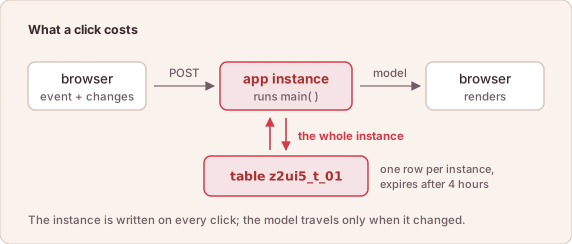
What a click costs: the instance to the database, the model to the browser.
The rule that follows is the same one a dynpro program with global variables lived by: keep in the instance what the screen shows, and nothing that can be read again.
In short: small instance, bounded model, one request per click. Everything else the system already does well.