#24Nothing Runs Between Two Clicks
A roundtrip occupies one dialog work process for as long as main( ) runs, and nothing runs between two roundtrips. What that means for a report that takes two minutes: the busy indicator, splitting the work, a background job, and a timer that polls it.
3 min read · 24 of 42
Read first: #7 for the roundtrip.
This essay is about work that takes longer than a click: the long report, the
progress display and the background job. The starting point is a claim from
#7: nothing runs between two clicks. No thread
waits, no promise resolves later, no controller ticks in the background. A
roundtrip starts when the browser posts, ends when main( ) returns, and in
between the app is a row in a table.
The dialog world handled the long case with an hourglass. A report ran for two
minutes in the foreground, SAPGUI_PROGRESS_INDICATOR told the user how far
it had got, and anything longer went to SM36. All three have an answer
here.
A long main( ) is a long dialog step. The roundtrip occupies one dialog
work process for as long as main( ) runs, and the runtime limit Basis
configured for dialog steps applies to it the way it always did. The browser
waits. After one second the UI5 busy indicator covers the screen, and clicks
made meanwhile are dropped, not queued. After ten minutes the frontend gives
up with No backend response within 600 seconds. For a SELECT that takes four seconds, nothing has to be written at
all.
What does not exist is progress during a roundtrip. The response is one
string that arrives when main( ) is done, so a percentage written halfway
through has nobody to read it.
Work that is long because it is big is split. A thousand documents are a hundred per roundtrip, with the position in an attribute and the next chunk started by the app itself. That turns one blocking request into a sequence the user can watch — and cancel, which the two-minute dialog step never offered.
Work that is long because it is long goes to a job. The app schedules it —
JOB_OPEN, SUBMIT ... VIA JOB, JOB_CLOSE, or the
cl_apj_rt_api of ABAP Cloud — keeps the job’s name in an attribute, and asks
for its status on a timer:
    IF client->check_on_event( `START` ).
      job_schedule( ).              " remembers job name and count
      poll( ).
    ELSEIF client->check_on_event( `POLL` ).
      status_read( ).               " TBTCO, or the API of ABAP Cloud
      IF status <> `F` AND status <> `A`.
        poll( ).                    " not finished: ask again
      ENDIF.
    ENDIF.
METHOD poll.
" one backend event in three seconds - without the busy overlay
client->follow_up_action( val = client->cs_event-start_timer
t_arg = VALUE #( ( `POLL` ) ( `3000` ) ( `X` ) ) ).
ENDMETHOD.cs_event-start_timer raises one backend event after a delay. It is
deliberately small: there is one timer per app, and every roundtrip cancels
it, so a timer keeps ticking only while each response starts it again. A poll
ends the moment the app stops asking, and an app the user has left polls
nothing. The three arguments are the event name, the delay in milliseconds,
and a flag: X suppresses the busy indicator for the tick, so the screen
stays usable while the poll runs.
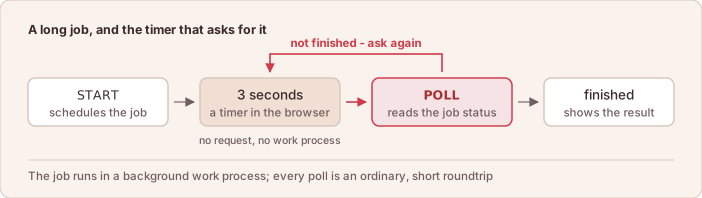
The loop: the job runs in the background, the browser asks, nothing waits in between.
The job itself runs where batch work always ran, in a background work process,
with its log in SM37 and none of the dialog limits. The screen is what it
was in the GUI: a view on the job, not the job.
Push instead of poll. Where polling every few seconds is too slow or too
chatty, the frontend’s z2ui5:Websocket control listens on an ABAP Push
Channel (APC, the server’s WebSocket endpoint). The job — or anything else on
the server — publishes through an ABAP Messaging Channel (AMC), and every
message arrives in the app as an ordinary backend event, with no JavaScript
written
(WebSocket).
An APC and an AMC have to be set up and operated, which is why the timer comes
first.
The timer, with the sample for a progress indicator and one for a view that refreshes itself, is on Timer.
In short: the hourglass is now a busy indicator, the progress bar is a poll, and the job is still a job.