#7One Click, One Request
The mental model under every abap2UI5 app - one click is one request and one call to main( ) on a fresh instance - and the three questions main( ) dispatches on, in order.
3 min read · 7 of 42
The mental model that everything else in the framework rests on fits in one
sentence: every click is one HTTP request, and every request is one call to
main( ) on a fresh instance.
That is the dynpro’s PBO (Process Before Output: build the screen) and PAI
(Process After Input: react to the user) under other names. A request arrives
with the event and what the user changed. main( ) runs, decides what
happens, and returns. Whatever it built travels back, the work process is
released, and the next click starts the same way. One such trip, from the
click to the new screen, is a roundtrip. Nothing runs between two clicks:
no timer, no controller, no promise waiting for something.
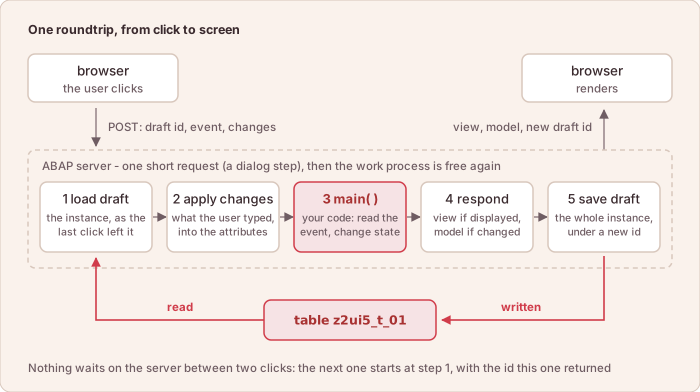
One roundtrip, start to end — the five steps every other article in this series zooms into.
The draft in the picture is the saved copy of the app instance, not a RAP draft; #11 explains it.
So main( ) is a dispatcher, and it dispatches on three questions the client
can answer:
  METHOD z2ui5_if_app~main.

    me->client = client.

    IF client->check_on_init( ).
      data_read( ).            " once - this instance has never run
      view_display( ).
    ELSEIF client->check_on_navigated( ).
      view_display( ).         " back from a sub-app or a popup: show the view again
    ELSEIF client->check_on_event( `SAVE` ).
      on_save( ).              " the model changed - the view stays as it is
    ENDIF.

  ENDMETHOD.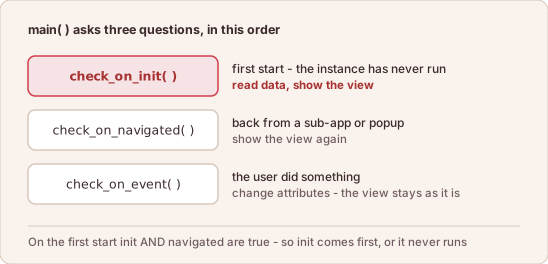
Three questions, in this order, and what each branch sends to the browser.
data_read( ), view_display( ) and on_save( ) are methods of the app
class itself. view_display( ) builds the view and hands it to
client->view_display( ).
Three rules come with this form. The first two are the mistakes most people make once.
Init Comes Before Navigated
check_on_init( ) is true exactly once, on the very first call.
check_on_navigated( ) is true on that first call as well. In an ELSEIF
chain the first match wins, so the init branch has to come first, or the
one-time setup never runs.
After a Return, Send a View
Coming back from a sub-app or a value help does not raise check_on_init( )
again. It raises check_on_navigated( ), and the browser is still showing
what the sub-app left. An app that builds its view only under init leaves the
user on that old screen. Nothing reports the mistake: the response carries no
view, and a response without a view is valid.
After an Event, the View Can Stay
The event handler changes attributes and returns. Bound controls update from
the model, and focus and scroll position stay where they were. The app calls
its view_display( ) again only when the structure of the screen changes.
#10 is about exactly that.
What Survives a Roundtrip
Only the instance itself survives from one call to the next. It is serialized after every request — #11. Local variables, an open cursor and a lock end with the work process, every time.
In short: one click is one request and one call of main( ), which asks
three questions in this order: init, navigated, event.