#15Where Your Own JavaScript Goes
The three declared seams for JavaScript of your own - a control method called by id, expression binding in the view, a custom control in the z2ui5_ccc BSP - and why there is no plugin system.
2 min read · 15 of 42
Sooner or later an app needs something the XML view cannot express. A chart
library. A control nobody has wrapped. A UI5 method that exists only as a
method — sap.m.Carousel moves through setActivePage( ) and through nothing
else, and no property will do it for you.
At this point frameworks usually add a plugin system, then a plugin registry, then documentation about lifecycle hooks. abap2UI5 deliberately has none of that. It has three extension points — the picture calls them seams — and each is a declared place. They are listed here from the cheapest to the widest.
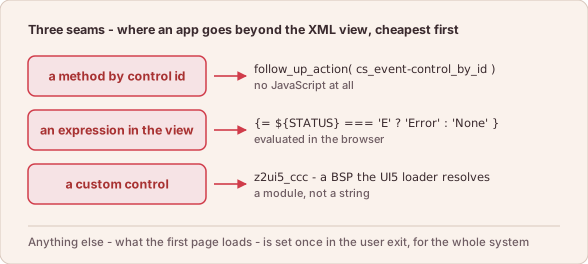
Three seams, from the cheapest to the widest: a method call by control id, an expression in the view, a custom control in its own BSP.
1. Call a Method of a Control
Some things exist in UI5 only as a method. Calling one needs no JavaScript at all. The client calls it on a control by id:
    " t_arg is positional: control id, method, parameters
    client->follow_up_action( val   = z2ui5_if_client=>cs_event-control_by_id
                              t_arg = VALUE #( ( `myCarousel` )
                                               ( `setActivePage` )
                                               ( `page2` ) ) ).
Any public method of the control can be called, unless the frontend’s
denylist refuses it: destroy, the bind… and attach… families, the
generic setAggregation and similar methods. A short list of methods also
declares the kind of each argument. setActivePage is on that list, which is
why page2 arrives as the page with that id and not as a string. An argument
beyond what an entry declares is dropped without a message, so read the list
in Frontend actions
first.
2. Compute in a View Attribute
UI5 expression binding is available in an app view —
{= ${STATUS} === 'E' ? 'Error' : 'None' }. The browser evaluates it against
the model that just arrived, with no roundtrip and no module to load. Write
the expression as a backtick literal, not as a string template. A template has
to escape every brace, and one missed escape is a parser error on the whole
statement.
3. Write a Custom Control
A custom control lives in a BSP of its own. The frontend resolves two reserved
resource roots: z2ui5_cci for the custom-controls addon and z2ui5_ccc for
a customer’s own extension. A control therefore loads through the UI5 loader
like any other module, and not as a string inside a view.
Everything Else Is a System Decision
Beyond the three, nothing is decided by an app. Frontend code of your own is a
custom control in the customer frontend BSP (z2ui5_ccc). What the initial
page loads is the bootstrap, set in the exit class that implements
z2ui5_if_ui5_exit
(User Exits).
That is one place, it can be reviewed, and it is the same for every app in the
system.
In short: an app extends the frontend in three declared places — a method call by control id, an expression in the view, a custom control — and the framework does not change for it.