#14The View Builder: Four Verbs, Every Control
Why z2ui5_cl_ui5_view_builder has four methods - ele, tag, a, end - instead of one per control, what the completion list cost, and what the linter gives back.
2 min read · 14 of 42
The first view builder in abap2UI5 had one method per UI5 control. button( ),
input( ), table( ) — hundreds of them, each with the control’s properties as
named parameters.
It was a good idea, for a real reason. ADT code completion listed them. A developer who did not know the UI5 API could press Ctrl-Space in the backend and be shown what a control accepted, in ABAP, without leaving the editor. The frontend API was available in the backend tooling.
It also had a hard limit. A control the class had no method for could not be written at all. Every new UI5 control was a pull request, and a wrapper is a translation — it can be behind, and it can be wrong, in a way the browser only discovers at runtime.
Its successor z2ui5_cl_ui5_view_builder has four verbs instead. ele opens
an element and moves into it, tag adds a child and stays where it is, a
sets an attribute on the element just added, and end moves back up. Those
four methods are the entire API.
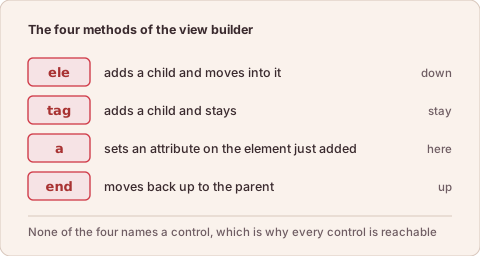
The four methods of the view builder, and where each one leaves the cursor in the tree.
A short chain shows where each verb leaves the cursor:
    view->ele( `Page`                     " into Page
        )->a( n = `title` v = `Orders`    " attribute of Page
        )->tag( `Button`                  " Button added, cursor stays in Page
            )->a( n = `text` v = `Save`   " attribute of the Button just added
        )->ele( `List`                    " into List
        )->end( ).                        " back up to Page
Nothing in there names a control, which is exactly why every control is reachable — including the ones released last month and the ones nobody has wrapped. The vocabulary stays UI5’s own, which is #4. The builder cannot be behind UI5, because it never knew what UI5 contains.
The cost is the completion list, which is gone. Two checks replace it. The chain is still ABAP, so the compiler checks it. And the abap2UI5 linter checks the view against the real UI5 metadata before it reaches a browser: an unknown control, a misspelled property, a member that does not exist in the oldest supported UI5 release. The last check finds the bug that a colleague on an old system used to find three weeks later.
In short: the view builder has four methods and names no control, which is why every UI5 control can be written with it.