#19URL, Reload and Back: Where the URL Went
SAP GUI had no URL. A browser has three buttons the GUI never had - reload, back and the address bar - and in abap2UI5 the app decides how much of itself the URL carries: nothing by default, the app state, or a route per app.
4 min read · 19 of 42
SAP GUI had no address bar. A transaction code started a program, the OK code
moved it along, and nobody ever bookmarked screen 200 of VA02 with order
4711 open in it — there was nothing to bookmark.
The browser gives the user three things the GUI never had: reload, back, and the address bar. Users try all three in the first week. What each one does depends on how much of itself the app writes into the URL. An app uses the default or one of three modes:
| Mode | Switched on with | Reload (F5) | Back button | Bookmark |
|---|---|---|---|---|
| Default | nothing | app starts fresh | leaves abap2UI5 | starts the app |
| App state | app_state_set_active( ) |
same screen, same input | leaves abap2UI5 | same screen, for four hours |
| Hash routing | cs_event-hash_routing |
same screen | returns to the calling app | same screen, or a fresh app in mode fresh |
| App-owned hash | hash_set( ) |
the app reads its hash | raises an event in the app | the app reads its hash |
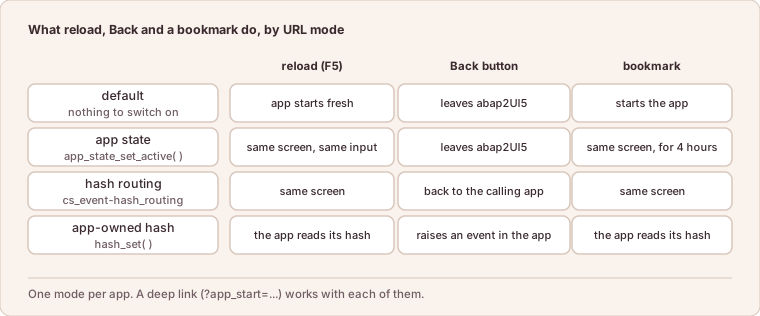
One mode per app: what reload, Back and a bookmark do in each.
An app picks only one of the three modes, because each uses the whole hash of the URL.
The Default: Nothing in the URL
The framework does not touch the hash. A reload sends a request without a
draft id, so the app named by ?app_start= starts fresh: check_on_init( )
is true again, and whatever the user typed is gone. Back leaves the abap2UI5
page, as it leaves any page. Nobody is surprised by this default, and for a
monitor, a report or a one-screen tool it is the right choice.
For anything a user works in, the app writes itself into the URL.
App State: Reload and Bookmark Restore the Screen
One call, usually where the view is first displayed:
    IF client->check_on_navigated( ).
      client->app_state_set_active( ).
      view_display( ).
    ENDIF.
From then on the URL carries #/z2ui5-xapp-state=<id>, and the id advances
on every roundtrip. A reload, a bookmark or the link pasted into another tab
comes back to exactly this screen: every value typed, the row selected, the
tab open.
No extra storage is needed. The id in the URL is the id of the draft — the
saved copy of the app instance that the framework writes after every request
anyway (#11). The link works
as long as the draft exists, four hours by default
(#26), and only for the user
who created it. For anybody else, or after it expired, the app starts fresh
and shows a toast that says so. client->app_state_get_href( ) composes the
absolute link, launchpad included, for a Share button or a QR code.
A restored state arrives in main( ) like a return from a sub-app:
check_on_navigated( ) is true and check_on_init( ) is not. The rule from
#7 applies: after a return, send a
view.
Hash Routing: Back Returns to the Calling App
Hash routing is switched on with
client->follow_up_action( client->cs_event-hash_routing ). The URL then
shows the running app as #/app/<CLASS>/<DRAFT>, nav_app_call( ) adds a
history entry, and the browser’s back button returns to the caller. That is
the stack of #18, controlled by the
button users press anyway. The mode cs_nav_mode-fresh keeps only the class
in the route, for apps where a bookmark should open the app without the old
input.
An App-Owned Hash
The third mode is for an app with routes of its own, such as tabs or a detail
view inside one class. hash_set( ) writes the hash. Once
cs_event-hash_attach_changed has registered an event, the back button or an
edited URL raises that event, and the hash is in
client->get( )-s_config-hash.
Deep Links: the Query String
The query string is separate from the three modes and works with each of
them. ?app_start=zcl_order_display starts a class, and the rest of the query
string belongs to the app: client->get( )-s_config-search holds it
unchanged, and the startup parameters of a launchpad tile arrive in
client->get( )-t_comp_params (#29).
Whoever holds the link can type both, so they are user input. An app that
opens order 4711 because the URL said so checks that this user may see 4711
(#38).
The details, with the cases that combine with the launchpad, are on App State and Hash Routing.
In short: by default the URL carries nothing and a reload starts the app fresh. App state, hash routing or an app-owned hash put as much of the app into the URL as the app chooses.