#18Navigation: CALL SCREEN, LEAVE SCREEN
The app stack - nav_app_call( ) pushes an instance, nav_app_leave( ) pops it, get_app_prev( ) hands the caller the sub-app with its typed attributes - and where popups and the launchpad fit.
3 min read · 18 of 42
Module pools had a call stack of screens. CALL SCREEN 200 pushed one,
LEAVE TO SCREEN 0 popped it, and the screen underneath came back with its
fields intact. It worked so reliably that nobody noticed it.
abap2UI5 has the same stack. The elements on it are app instances.
Two Screens in One Class
Within one class no stack is needed. A flag or a step number decides which
view the app’s view_display( ) method builds, and the event handlers change
that flag. Two views over the same internal table are two branches of one
class. Use this form whenever the screens share their data: there is no
navigation and no handover.
From One Class to Another
Between classes the framework keeps the stack:
    " push: the called app takes the screen, this instance waits underneath
    client->nav_app_call( NEW zcl_sample_detail( order_id = order_id ) ).
" pop: back to the caller, which is called again with check_on_navigated( )
client->nav_app_leave( ).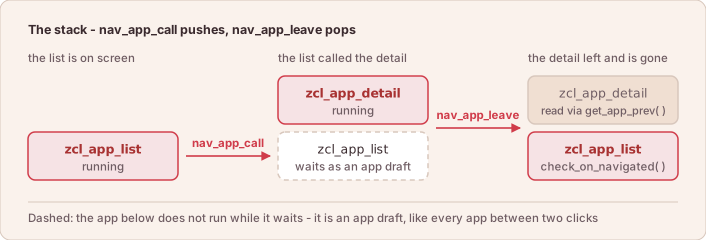
Push and pop: the app below does not run while it waits, it is a draft.
A draft here is the saved copy of an app instance, not a RAP draft (#11).
The caller gets main( ) called again, check_on_navigated( ) is true, and
its own attributes are still there — the instance was serialized while it
waited. What it has to do is show its view again, because the browser is still
displaying the sub-app’s. And it can read what the sub-app left behind:
    ELSEIF client->check_on_navigated( ).
      TRY.
          DATA(detail) = CAST zcl_sample_detail( client->get_app_prev( ) ).
          message = detail->result.
        CATCH cx_sy_move_cast_error.
          " not a return from the detail app, so there is no result to read
      ENDTRY.
      view_display( ).
The CAST shows what comes back: the sub-app instance itself, with all its
typed attributes, and not a string in a parameter table. CALL SCREEN could
never return a whole object.
nav_app_leave( ) called with an app instance is LEAVE TO TRANSACTION:
it starts the given app without pushing the current one, so there is nothing to
return to.
Popups
A popup works the same way, on a smaller part of the screen.
popup_display( ) takes a fragment instead of a view and popup_destroy( )
closes it. In between it is ordinary binding: the popup’s inputs are
attributes of the same class. A popup that several apps use becomes a class of
its own: an ordinary z2ui5_if_app that displays a popup and ends with
nav_app_leave( ). The caller reads the result through get_app_prev( ), as
above.
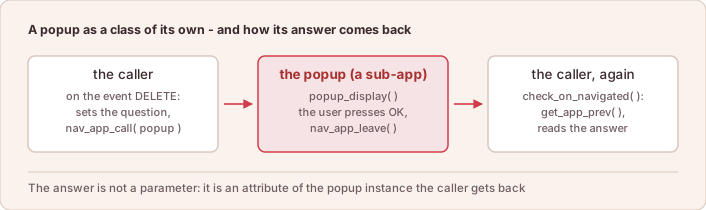
The same mechanism for a popup: its answer is an attribute of the instance the caller gets back.
Not on the Stack: the Fiori Launchpad
Navigation between Fiori apps goes through the launchpad’s cross-app
navigation, so that the launchpad’s history and back button keep working. That
is a cs_event constant and not a nav_app_call( ); see
Cross-App Navigation.
In short: nav_app_call( ) puts another app on the stack,
nav_app_leave( ) returns to the caller, and the caller reads the result from
the instance it gets back.