#39Where UI5 Comes From
Which UI5 an abap2UI5 app runs on is one string in the exit class: OpenUI5 from the CDN by default, SAPUI5 or a pinned version from ui5.sap.com, or the system's own UI5 - and in the launchpad, the launchpad's. What each choice decides for network, licence, version and upgrade.
3 min read · 39 of 42
This essay answers two questions an architect asks before go-live: where does the browser get UI5 from, and who decides when it changes? The UI5 version is a configuration decision and does not depend on the SAP release (#31). This is that configuration.
The page an abap2UI5 app starts on is generated by the framework, and its
<script> tag names a URL. That URL comes from one field of the exit class (z2ui5_if_ui5_exit), the one extension point of an installation
(User Exits):
  METHOD z2ui5_if_ui5_exit~set_config_http_get.

    cs_config-src   = `https://ui5.sap.com/1.120.0/resources/sap-ui-core.js`.
    cs_config-theme = `sap_horizon`.

  ENDMETHOD.
Without an exit, the field holds the default: OpenUI5 from
sdk.openui5.org, the latest release, through the cache-buster. It works
on a fresh installation without any setup, which is why it is the default. A
productive system should change it. The choices, and what each one decides:
| Source | The browser needs | Licence | Who decides the version |
|---|---|---|---|
OpenUI5 from sdk.openui5.org, latest (the default) |
internet | open source | nobody: it changes when a new release is published |
| SAPUI5 or OpenUI5 from the CDN, version in the path | internet | SAPUI5: your SAP licence | you, with one string |
| The system’s own UI5 | the SAP system only | your SAP licence | Basis, with the UI5 component of the system |
| In the launchpad | the launchpad | your SAP licence | the launchpad |
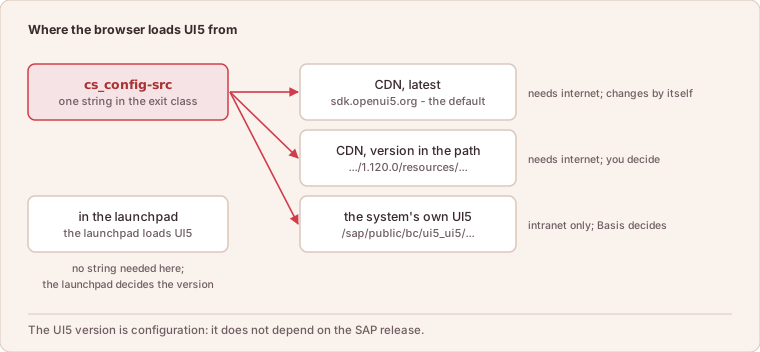
One string decides the source; in the launchpad, the launchpad decides.
The Choices in Detail
OpenUI5 or SAPUI5. OpenUI5 is the open-source subset and carries what most
apps use — sap.m, sap.ui.layout, sap.ui.table, sap.f, sap.uxap.
SAPUI5 from ui5.sap.com adds the SAP-licensed libraries: the smart controls
and ValueHelpDialog of sap.ui.comp, the VizFrame charts, the rich text
editor, the spreadsheet export. An app that names one of those controls needs
SAPUI5. The framework does not check this: the view names a control, and the
library that was loaded has it or not (#4).
Latest or pinned. Without a version in the path the CDN serves whatever
SAP released last. A UI5 change then reaches every app on the day it is
published, with no transport, no test and no change window. A version in the
path (/1.120.0/) makes the UI5 upgrade what every other upgrade is: a change
to one string, tested and transported. The oldest release the framework
supports is 1.71. The linter checks every view against it
(#14), so a control that is too new
is found in the pipeline, not on the screen.
CDN or the system’s own. /sap/public/bc/ui5_ui5/resources/sap-ui-core.js
loads the UI5 installed on the SAP system itself. Nothing leaves the intranet,
and the browser needs no route to the internet, which some networks do not
have. The price is that the UI5 version is now the system’s version. It
changes when Basis updates the UI5 component, not when the app needs a
control.
With a CDN, note who fetches: the browser, not the server. The SAP system needs no outbound connection; the user’s machine needs to reach the CDN. The page’s Content Security Policy (CSP, the browser rule for which sources a page may load) allows the SAP and OpenUI5 hosts and nothing else. A different host — a mirror, a proxy — is added in the same exit class (Security).
In the launchpad, the launchpad decides. A tile loads the abap2UI5
frontend into the Fiori launchpad
(#29), and there the UI5 is the one the
launchpad itself runs on. The bootstrap URL above applies to
the standalone page only. An app that has to know asks at runtime —
client->get( )-s_ui5-version — and an installation that runs both ways tests
against both versions.
The theme is the second field: sap_horizon by default, and any theme the
loaded UI5 knows — or, in the launchpad, the one the user picked there.
Every source with its URL, the pinning and the cache-buster, is on Bootstrapping and UI5 Versions.
In short: which UI5 runs is one string in one method. The decision behind it — the network, the licence, who upgrades and when — belongs to the installation and should be made deliberately, once.