#13Where the Selection Screen Went
The variable and the field are one declaration again.
2 min read · 13 of 42
Long before anyone said “full-stack” in a job ad, ABAP had this:
REPORT zre_app_input.
  PARAMETERS pa_arbgb TYPE t100-arbgb DEFAULT `MDG_TR`.
START-OF-SELECTION.
  MESSAGE |Input: { pa_arbgb }| TYPE `I`.
Four lines, and every layer is present. A screen exists. It has a labeled, typed input field with a default and value help. It validates. It handles the event. Nobody wrote a frontend, because declaring the variable was writing the frontend.
Take a moment with that. A generation of developers built a decade of business software on it, and most of them never once thought of it as remarkable.
That trade — you name the data, the system draws the screen — is what made ABAP productive for thirty years, and it is what quietly disappeared on the way to the browser. The variable and the field it appears in became two artifacts in two places, maintained by two people, kept in step by a service in between.
abap2UI5 puts them back together with _bind:
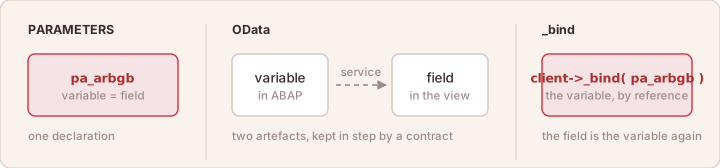
PARAMETERS: one declaration is the variable and the field. OData: variable and field are two artifacts with a service between. _bind: the field is the variable again.
    )->tag( `Input`
        )->a( n = `value` v = client->_bind( pa_arbgb )
The attribute is not a field name in a string. It is the ABAP variable, handed over by reference; the framework builds the model around it, ships it, takes the user’s input back and puts it where it came from. What the developer maintains is a variable, in a class, next to the code that reads it.
It is not the same deal as PARAMETERS, and pretending otherwise would be
dishonest — the layout is written by hand here, because the screen is UI5 and
UI5 has a great deal more to say than a selection screen did. What comes back
is the other half: one place where the data lives, and no service between the
field and the variable.
For a report that already exists, the hand-written layout has a shortcut.
report2UI5 converts a classic report’s user interface — the selection screen,
the event blocks, the WRITE list, the ALV, the messages — into a class that
renders through abap2UI5, and leaves the report’s logic as it was
(Report Migration).