#23100 Rows, Four Hours, One Request
The three numbers behind performance.
2 min read · 23 of 38 in reading order
Three numbers decide whether an abap2UI5 app feels fast, and none of them is in your code. Learn them before you bind your first table — the first one in particular has cost more debugging hours than it has any right to.
100 rows. Every UI5 JSON model exposes at most 100 items to a list binding by default. Bind a table with 300 entries and the first 100 render — the rest are silently dropped, with no error anywhere, in ABAP or in the browser console. It is a UI5 setting, not a framework one, and it is raised per view from ABAP:
    client->follow_up_action( val   = client->cs_event-set_size_limit
                              t_arg = VALUE #( ( `1000` )
                                               ( client->cs_view-main ) ) ).
Raising it is the fix for a table of a thousand rows. It is not the fix for a
table of fifty thousand: every bound row travels to the browser with the
response, and back to the database with the draft. A screen that needs that
many pages in ABAP — a SELECT with UP TO, a growing table, a filter bar —
the way a selection screen always did.
Four hours. The serialized instance from #9
lives in z2ui5_t_01 until it expires, four hours by default. A user who comes
back after lunch continues where they were; one who comes back tomorrow starts
fresh. The number is draft_exp_time_in_hours in the user exit, and this table
is the one place in the framework that grows. It is also the one that cleans
itself: on every first start of an app the framework deletes every row older
than the expiry, one DELETE and a COMMIT WORK, so the table holds at most
the clicks of the last four hours. How that adds up for a given number of
users is #38.
One request. Every click is one HTTP roundtrip plus one read and one write
of the draft. So the cost of a click is the size of the instance plus the size
of the model — and, as #9
warned, those are the same attributes. An app that carries a catalog of ten
thousand rows in an attribute pays for it on every single click, in either
section. An app that re-reads what it needs pays a SELECT, which the database
was built for and is extremely good at.
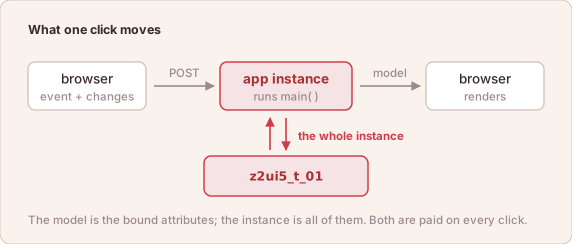
What a click costs: the instance to the database, the model to the browser.
The rule that follows is the same one a dynpro program with global variables lived by: keep in the instance what the screen shows, and nothing that can be read again.
Small instance, bounded model, one request per click. Everything else the system already does well.